
Uncategorized
Stockscores Trading Challenge
The Stockscores Trading Challenge is an engaging and educational way to participate in the stock market without risking your capital. Use it to develop your trading skills, develop new strategies and test your market acumen. The Stockscores Trading challenges lets you see how your trading skills compare to the community of Stockscores traders.
It is important to know that the Stockscores Trading Challenge is a stock picking game. Each trade that you make will earn a TradeScore and the individual TradeScores are compiled to create your ranking in the game. This means you can join the game at any time and still have the potential to be on the Leaderboard.
We encourage you to view these short videos which explain how to play the Stockscores Trading Challenge and to understand how the TradeScores and rankings are calculated.
LINK TO INTRO VIDEO and LINK TO UNDERSTANDING THE TRADESCORE VIDEO (coming soon)
How to Play the Stockscores Trading Challenge
Overview
The Stockscores Trading Challenge is a stock picking game. It does not consider overall portfolio performance but instead, rates the quality of your trades based on reward gained for risk taken, percentage return and hold period.
The game is designed to be ongoing; a player who joins six months after another is not at a disadvantage. It is your most recent 30 trades that determine your ranking in the Challenge.
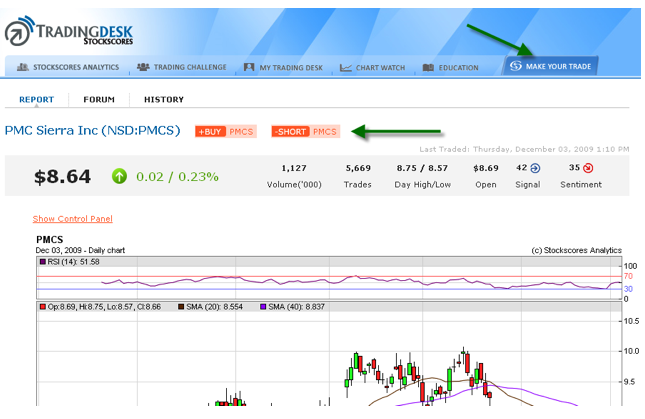
To play the game you simply need to make simulated trades using the Trade Ticket which is accessed from the Make Your Trade tab on the menu bar.
This game requires that you use stop loss points for every trade. You can put the stop loss at what ever price you like but where you place it will have a significant effect on your TradeScore. Set your stop too tight and you might get taken out before the stock makes its move. Set the stop too wide and you lose valuable points in the calculation of your TradeScore. See the “Measuring Performance” area of this How to Play description for more on how the TradeScores are calculated.
Practicing in the Trading Sandbox
We strongly suggest that you practice before you play the Stockscores Trading Challenge. When placing a simulated trade, you have the choice to make that trade in the Trading Sandbox by selecting it from the pull down menu on the Trade Ticket.
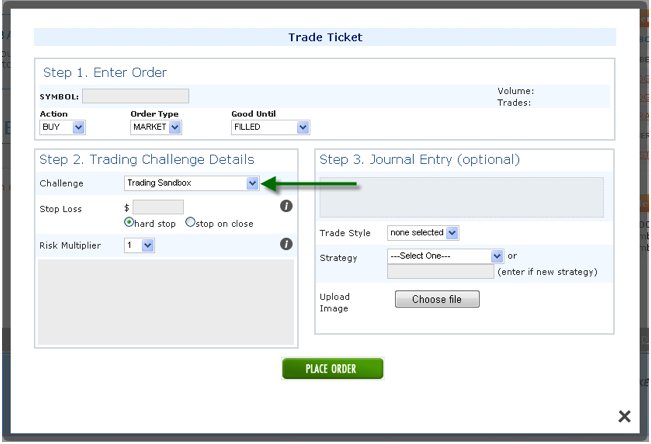
Trades made in the Trading Sandbox are tracked for your own purposes but they are not included in the actual trading challenge that you are participating in.
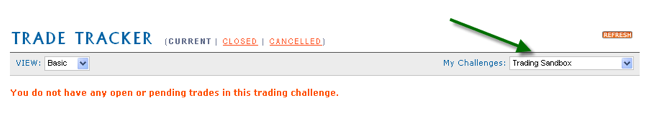
You can see the practice trades you make in the Trade Tracker by selecting the Trading Sandbox from the pull down menu shown below:
Entering a Trade
All trades for the Stockscores Trading Challenge are made through the Trade Ticket. This can be accessed from the Make Your Trade tab in the menu bar or from a Stock Report.
The Trade Ticket
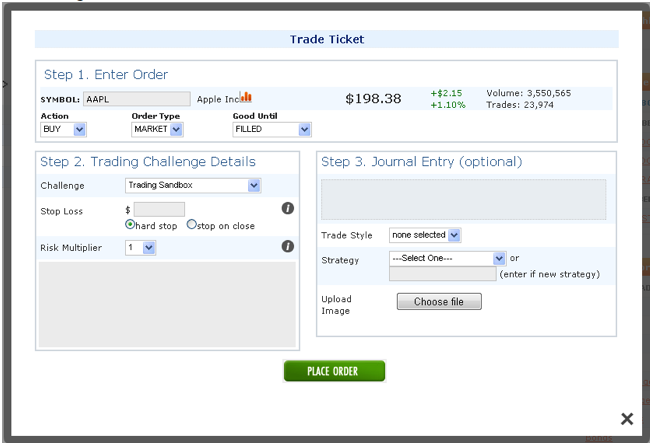
This is the Trade Ticket. You will use this to make any trade in a Trading Challenge or the Trading Sandbox.
1. Enter Order
The first step is to enter the symbol of the stock you wish to trade. Once the symbol has been activated, there are three pull down menus to use to define your order.
Action
- Buy the stock
- Sell the stock (this will only appear if you already have a bought position in the stock)
- Short the stock
- Cover the short (this will only appear if you already have a short position in the stock)
Order Type
- Market – enter the trade at the market price at the time. Although the Trade Ticket will display a delayed price quote, you will actually be filled at the real time price at the time you make the trade.
- Limit – enter the trade at a specific price that you select. For a limit order to be filled requires that the market trade at the limit price.
- Stop – enter the trade if the market comes to the stop price you enter. For example, if the stock is trading at $10 and you enter a Buy Stop at $10.50, the trade will only be entered if the stock rises in price to trade at $10.50.
Good Until
This pull down menu determines how long your order is valid for. You can select until the end of today, until filled or a specific date. Once the Good Until threshold is hit, the trade will either be executed or deleted.
2. Trading Challenge Details
This is the other mandatory part of the Trade Ticket. Here you can select the Trading Challenge that would like the trade applied to and enter your stop loss price and risk multiplier.
Stop Loss
This is the price where your trade will be exited at a loss. A hard stop triggers an exit if the stop loss price is hit. A stop on close triggers an exit if the stock closes the trading day below the stop loss price.
The Stop Loss is required because it plays an important role in the calculation of the TradeScore. Risk management is an essential part of trading and traders will earn a higher TradeScore if they manage risk effectively. The more reward (the difference between a profitable exit price and your entry price) you earn for the risk (the difference between the entry price and the stop loss price) you take, the higher your TradeScore. This is discussed in more detail in the Measuring Performance Section of this document.
Risk Multiplier
The risk multiplier allows you to allocate more risk to a particular trade. Position size is determined by the Risk Tolerance divided by the Risk per Share. If you buy a stock at $10 with a stop loss price of $9, you have $1 in Risk per Share. If you are willing to take $500 of risk on one trade (the Risk Tolerance) then you would purchase 500 shares.
With the risk multiplier, you could take a greater multiple of Risk Tolerance. If you choose to apply a Risk Multiplier of 2 to a trade, you will take double the position that you would normally take. This also means that your TradeScore will be doubled for that trade and its inclusion in the calculation of your overall ranking for the Challenge.
Use the Risk Multiplier if you have a higher degree of confidence on one trade but recognize that if you are wrong and you lose on the trade, you will have a higher negative TradeScore to be used in your overall Trading Challenge ranking.
3. Journal Entry (Optional)
The Journal Entry section of the Trade Ticket is optional. It allows you to enter comments to be review for your self and to be shared in the Stockscores Trading Desk community. This is a good place to write your reasoning for making a trade, define the style of trade, the strategy or include an image that you want to include.
Your comments and images entered here will form an entry in your Trade Journal so that you can go back and review the trade later. You will also be able to add comments to your Trade Journal once you are in a trade.
Place Order
Once you have filled out the Trade Ticket, click on the Place Order button to execute the trade.
When the order is filled, it will be listed on the Current tab of the Trade Tracker, found in the My Trading Desk section.
Remember that your fill prices are based on the real time pricing at the time you make the trade. We are unable to display the real time quote when making the trade but you will be filled at the prevailing price in the actual stock market.
Tracking a Trade
The trades you make in the Trading Challenge or the Trading Sandbox are tracked within the My Trading Desk section.
My Trading Desk
There are four functional areas of the My Trading Desk section.
Trade Tracker
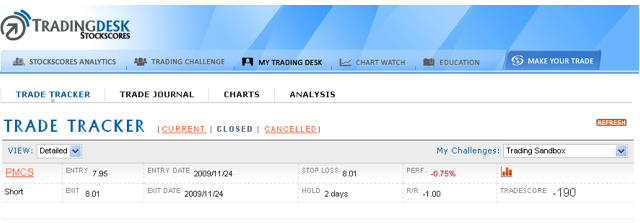
The Trade Tracker provides a table view of your Current, Closed or Cancelled trades. Here you can see the TradeScores and other performance metrics for the trades you are in or have completed.
There are two view types for the Trade Tracker which can be selected from the pull down menu in the upper left of the screen.
By clicking on the small chart icon, , you can bring up a small chart of the stock that was traded. If you click on the symbol of the stock, you will go to a larger and more detailed chart view.
Trade Journal
The Trade Journal is an important tool for every trader. It allows you to keep a log of your trading thoughts, chart references and trade details. Images uploaded to the Journal form part of it, to be referenced any time in the future.
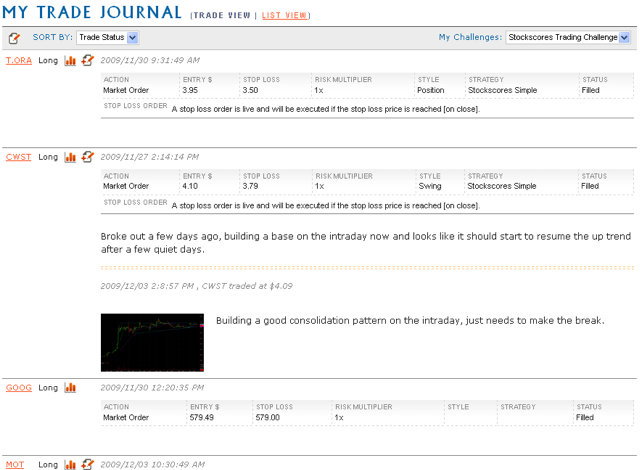
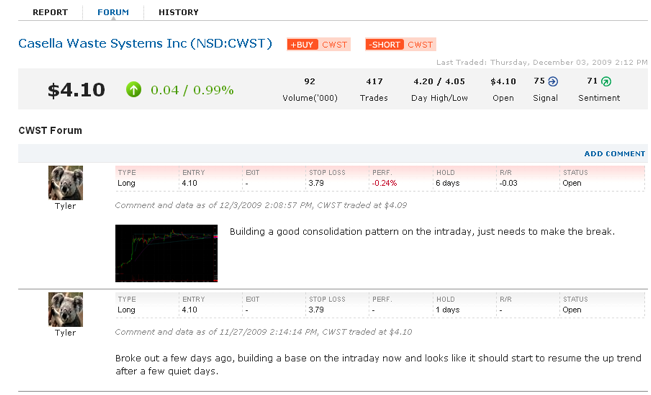
Plus, the trades that you make and the comments you post to the Journal form part of the Stockscores Trading Desk community discussion.
Exiting a Trade
The simplest way to exit a trade is to initiate an exit order from the Trade Tracker inside the My Trading Desk section.
Go to the Current trades table and click on the Exit button:

This will bring up the Trade Ticket for the stock you have selected.
The Trade Ticket
Enter Order
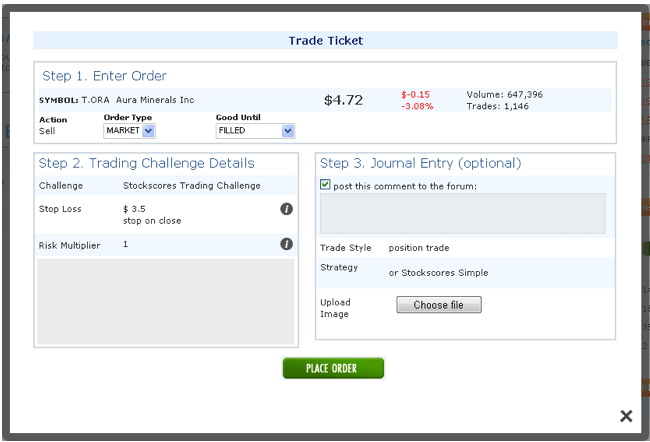
Choose the Order Type and Good Until selections, enter any comments or images you wish to post to your Trade Journal and then click on the Place Order button.
Once your trade has been exited, it will appear in the Closed trades table in the Trade Tracker.
Measuring Performance
The trades you make in the Trading Challenge earn individual TradeScores but they also contribute to your overall trader rank. You can join the game at any time and have a chance to sit atop the leaderboard in the overall Trading Challenge.
How the TradeScore is Calculated
There are four important components determining the TradeScore.
• Risk – the dollar difference between the entry price and the initial stop loss price.
• Reward – the dollar difference between the exit price and the entry price.
• Hold Period – the number of days a position is held (minimum used is 5 days)
• Risk Multiplier – the weighting of risk tolerance for the trade
From these variables, we can calculate the components of the TradeScore.
• Percent gain/loss – Reward/Entry Price
• Reward for Risk Ratio – Reward/Risk
• Annualization Factor – Hold Period / Number of Trading Days in Year
This leads to the TradeScore formula
Percent Gain/Loss * Absolute Value of Reward for Risk * Annualization Factor * Risk Multiplier * 100
For example, a stock is bought at $10 with an initial stop at $9. 10 days later, it is sold at $12. The trader used a risk multiplier of 1 when submitting the trade.
Percent Gain/Loss = ($12 – $10)/$10 = 20% or 0.20
Absolute Value of Reward for Risk = ($12 – $10)/($10-$9) = 2
Annualization Factor = 252 trading days in year / 10 day hold period = 25.2
Risk Multiplier = 1
0.20 * 2 * 25.2 * 1 * 100 = 1008
How the Rankings are Calculated
Your ranking in the Trading Challenge is based on the recent trades that you have made. If you have made less than the minimum number of trades, your ranking will be lower because we take an average of the qualifying trades.
First, we must establish three different trades types as these determine how the ranking is calculated.
• Day Trade – Hold period of 2 days or less
• Swing Trade – Hold period of greater than 2 days but less than or equal to 30 days
• Position Trade – Hold period of greater than 30 days
Days held are based on trading days and not calendar days.
Individual trades are weighted based on their age. This is done so that traders who are active in the game and have made recent trades are able to rank higher than those that are not playing.
This does not mean that you have to be a short term trader to compete as how trades are weighted varies based on their hold period.
To achieve a 100% weighting in the calculation,
• Day Trades must have been exited within the last 30 days
• Swing Trades must have been exited within the last 90 days
• Position Trades must have been exited with the last 365 days
A trade will suffer a declined weighting according to the following:
- Closed Day Trades will decline at 3-1/3% per day for 30 trading days, starting 31 days past the exit date
- Closed Swing Trades will decline at 2% per day for 50 trading days, starting 91 days past the exit date
- Closed Position Trades will decline at 1% per day for 100 trading days, starting 366 days past the exit date
- Open Trades will have 100% weighting
The average Tradescore will be a numerical average of the weighted TradeScores based on a minimum # of trades.
- Day Trader – 20 trades
- Swing Trader – 16 trades
- Position Trader – 10 trades
The following types of trades will always be included:
- Open trades that have a hold period that is greater than the average hold period for the trader
- Closed trades that have a 100% weighting
Where there are more than the minimum required, all trades will be included in the average.
If the total of the above trades does not reach the limit based on the type of trader, weighted trades will be used to reach the minimum limit according to the following hierarchy:
- Closed trades that have a weighting of 50% or better
- Open trades
- Closed trades that have a weighting of less than 50%
The Average TradeScore adds up all the applicable TradeScores and divides by the total number of applicable trades. If there are less than the minimum required trades, the Average TradeScore will be multiplied by the fraction of the # of trades/minimum required (eg/ 18/20=0.9)
Understanding the Reward for Risk Measure
The Stockscores Approach puts a heavy emphasis on risk management. At the core of good risk management is the Reward for Risk ratio.
Traders should never judge their success by the dollar or percentage value gained or loss. Instead, the outcome of the trade should be judged in consideration of risk taken. Making $1000 with $5000 risked is not as good of a trade as one that makes $1000 with only $500 risked.
The amount you risk is not based on the total value of the trade, but instead, by the difference between your entry and stop loss price.
If you buy a stock at $10 with a stop at $9, you have $1 a share in risk. If you are willing to risk $500 on that trade then you will buy 500 shares.
This approach to risk management allows you to assign the same amount of risk regardless of a stock’s volatility. A more volatile stock will have a wider stop loss point and therefore, more risk per share. This means that the dollar position size will be smaller.
This approach to risk management requires a good understanding of where to put stop loss points. Stops set too tight can be triggered before the stock has a chance to make a move. Stops set to wide will lower the size of the position and hurt overall profitability.
The Money Talks Trading Challenge Rules
THE MONEY TALKS TRADING CHALLENGE (THE “CHALLENGE”) IS INTENDED TO BE CONDUCTED IN CANADA ONLY AND SHALL BE CONSTRUED AND EVALUATED ACCORDING TO APPLICABLE CANADIAN LAW. VOID IN WHOLE OR PART WHERE PROHIBITED BY LAW. ENTRY IN THIS CHALLENGE CONSTITUTES ACCEPTANCE OF THESE CHALLENGE RULES (THE “CHALLENGE RULES”). THE CHALLENGE IS A STOCK MARKET SIMULATION GAME AND ALL TRADES MADE IN THE CONTEST SHALL NOT CONSTITUTE ACTUAL STOCK MARKET TRADES
1. Trading Sandbox vs. Trading Challenge. The Trading Sandbox allows Registrants to track their progress and evaluate how well their stocks are doing, without affecting their challenge results. The Trading Challenge is what determines a player trade’s success in the challenge and what a player will be evaluated on for community ranking.
2. Eligible Securities. Registrants can buy or short any common stock, preferred stock, or ETF (each, a “Stock”) listed on NYSE, NASDAQ, AMEX, TSX or OTCBB securities exchange that is quoted by Stockscores with a daily number of trades of 1 or higher. Registrants cannot trade pink sheet stocks, mutual funds, options, futures, or bonds.
3. Order Types and Trade Execution. Market, limit, and stop orders will be accepted. All orders are executed at the real-time bid/ask prices when placed during market hours. Due to TSX, NASDAQ, NYSE and AMEX regulations, the Challenge Website will display a delayed price estimate for 15-20 minutes. Each transaction made by a Registrant will automatically appear in the Registrant’s Trade Tracker transaction history.
Orders placed while the markets are closed will be executed at an appropriate bid/ask price shortly after the market opens and will be contingent on trading volume on that particular Stock. If the Stock requested has not traded that day the trade will be cancelled.
Transactions placed after market hours can be viewed in the Registrant’s Trade Tracker history. Pending transactions can be cancelled until 9:25 am ET on the day the trade is scheduled for execution. Pending market orders placed on halted stocks will be cancelled if trading does not resume by the end of the day.
Limit and stop orders may be placed as “Day” orders which are good for the day only, or as “GTC” orders, which are good until cancelled.
4. Short Sells. Short sells are permitted and short orders do not need an uptick to be filled.
5. Splits, Dividends and other Corporate Actions. Most Stock splits, dividends, and other corporate actions reported by the news wires will be accounted for after the markets have closed and prior to the next market opening. These situations may cause account values to be misrepresented until the reconciliation occurs.
6. Trading Halts. Halted, restricted, and blocked Stocks will not be available for trading. Any trade that is confirmed after trading has been halted will be reversed.
7. Cancelling Market Orders. Registrants cannot cancel market orders placed during market hours.
8. Discrepancies. Registrants must report any account discrepancy within one (1) week from the transaction date. Stockscores will investigate and adjust any valid discrepancy. Discrepancies reported after one (1) week may or may not be adjusted at Stockscores’ sole discretion. All decisions of Stockscores will be final.
9. Initial Public Offerings. Initial Public Offerings (“IPOs”) may only be traded once they are listed on the exchange and their quotes are carried by Stockscores. Pending trades on IPOs will be executed at the market price, not the IPO price.
10. Winners and Leader Board. Registrants’ positions on the leader board are unofficial.
11. Indemnification by Registrant. By registering for the Stockscores Trading Challenge, Registrant releases and holds Releasees harmless from any and all liability for any injuries, loss or damage of any kind to the Registrant or any other person, including personal injury, death, or property damage, resulting in whole or in part, directly or indirectly, from acceptance, possession, participation in the Contest, or any breach of the Contest Rules. The Registrant agrees to fully indemnify Releasees from any and all claims by third parties relating to the Stockscores Trading Challenge, without limitation.
12. Limitation of Liability. Stockscores Analytics assumes no responsibility or liability for lost, late, unintelligible/illegible, falsified, damaged, misdirected or incomplete entries, trades, notifications, responses, replies, or for any computer, online, software, telephone, hardware or technical malfunctions that may occur, including but not limited to malfunctions that may affect the transmission or non-transmission of a trade. Stockscores Analytics is not responsible for any incorrect or inaccurate information, whether caused by website users or by any of the equipment or programming associated with or utilized in the Stockscores Trading Challenge or by any technical or human error which may occur in the administration of the Stockscores Trading Challenge. Stockscores Analytics assumes no responsibility for any error, omission, interruption, deletion, defect, delay in operation or transmission, communications line failure, theft or destruction or unauthorized access to, or alteration of, entries. Stockscores Analytics is not responsible for any problems, failures or technical malfunction of any telephone network or lines, computer online systems, servers, providers, computer equipment, software, e-mail, players, or browsers, on account of technical problems or traffic congestion on the Internet, at any website, or on account of any combination of the foregoing. Stockscores Analytics is not responsible for any injury or damage to Registrant or to any computer related to or resulting from participating or downloading materials in any Stockscores Trading Challenge. Stockscores Analytics assumes no responsibility or liability in the event that the Stockscores Trading Challenge cannot be conducted as planned for any reason, including those reasons beyond the control of Stockscores, such as infection by computer virus, bugs, tampering, unauthorized intervention, fraud, technical failures, or corruption of the administration, security, fairness, integrity or proper conduct of this Stockscores Trading Challenge and the www.stockscores.com website.
13. Conduct. By participating in the Challenge, each Registrant agrees to be bound by the Stockscores Trading Challenge Rules. CAUTION: ANY ATTEMPT TO DELIBERATELY DAMAGE THE CONTEST WEBSITE OR ANY RELATED WEBSITE OR UNDERMINE THE LEGITIMATE OPERATION OF THE CHALLENGE MAY BE A VIOLATION OF CRIMINAL AND CIVIL LAWS. SHOULD SUCH AN ATTEMPT BE MADE, STOCKSCORES ANALYTICS RESERVE THE RIGHT TO SEEK REMEDIES AND DAMAGES TO THE FULLEST EXTENT PERMITTED BY LAW, INCLUDING BUT NOT LIMITED TO CRIMINAL PROSECUTION.
14. Privacy/Use of Personal Information.
By participating in the Stockscores Trading Challenge, Registrant: (a) grants to Stockscores Analytics the right to use his/her name, mailing address, and e-mail address for the purpose of administering the challenge, including but not limited to contacting and announcing the competitors; and (b) acknowledges that Stockscores Analytics may disclose his/her Personal Information to third-party agents and service providers.
By opting-in online you consent to Stockscores Analytics’ disclosure of your Personal Information and to notify you about related products or services.
Stockscores Analytics will use the Registrant’s Personal Information only for identified purposes, and protect the Registrant’s Personal Information in a manner that is consistent with Stockscores’ Privacy Policy available at www.stockscores.com.
15. Intellectual Property. All intellectual property, including but not limited to trade-marks, trade names, logos, designs, promotional materials, web pages, source code, drawings, illustrations, slogans and representations are owned by Stockscores Analytics. All rights are reserved. Unauthorized copying or use of any copyrighted material or intellectual property without the express written consent of its owner is strictly prohibited.
16. Termination. Subject to the jurisdiction of the Régie des alcools, des courses et des jeux in Quebec, Stockscores Analytics reserve the right, in their sole discretion, to terminate the Stockscores Trading Challenge, in whole or in part, and/or modify, amend or suspend the Stockscores Trading Challenge, and/or the contest Rules in any way, at any time, for any reason without prior notice.
17. Law. These are the official Stockscores Trading Challenge rules. The challenge is subject to applicable federal, provincial and municipal laws and regulations. The Rules are subject to change without notice in order to comply with any applicable federal, provincial and municipal laws or the policy of any other entity having jurisdiction over Stockscores Analytics. All issues and questions concerning the construction, validity, interpretation and enforceability of the contest Rules or the rights and obligations as between the Registrant and the Sponsors in connection with the Stockscores Trading Challenge shall be governed by and construed in accordance with the laws of the province of British Columbia including procedural provisions without giving effect to any choice of law or conflict of law rules or provisions that would cause the application of any other jurisdiction’s laws.
18. Language Discrepancy. In the event of any discrepancy or inconsistency between the terms and conditions of the Contest Rules and disclosures or other statements contained in any Stockscores Trading Challenge materials, including but not limited to the contest entry form, or point of sale, television, print or online advertising, the terms and conditions of the Stockscores Trading Challenge Rules shall prevail, govern and control.

Are you up for the Challenge?
Put your trading skills to the test Play the Money Talks Trading Challenge. Test-drive your trading strategies and compete to win amazing prizes! All proceeds go to Special Olympics BC so refer your friends today




 |
 |
1st Prize:Win 5 Gold Maple Leafs contributed by Border Gold worth over $6,500.
3rd Prize: $750 Earing and Cufflink Set thanks to Teck Corp.
4th Prize: $500 in Silver Coins thanks to Endeavor Silver Corp
 |
Random draw Weekly – 2 1-oz Silver coins from Endeavor Silver Corp
Random draw From profitable trades – 1- 10oz silver coin courtesy of Silver Wheaton
(test text)
-
I know Mike is a very solid investor and respect his opinions very much. So if he says pay attention to this or that - I will.
~ Dale G.
-
I've started managing my own investments so view Michael's site as a one-stop shop from which to get information and perspectives.
~ Dave E.
-
Michael offers easy reading, honest, common sense information that anyone can use in a practical manner.
~ der_al.
-
A sane voice in a scrambled investment world.
~ Ed R.
Inside Edge Pro Contributors

Greg Weldon

Josef Schachter

Tyler Bollhorn

Ryan Irvine

Paul Beattie

Martin Straith

Patrick Ceresna

Mark Leibovit

James Thorne

Victor Adair